2 Blimp Command Language
2.1 Overview
This chapter gives a detailed account of the Blimp’s scripting language. Blimp commands can be entered in the Blimp Studio syntax editor or in a plain text file with .imp as the file extension. The code block below shows a typical script with many of Blimp’s major commands.
DATA: data.dat;
VARIABLES: id a1:a4 y m x1:x3 z1 z2;
ORDINAL: x1;
NOMINAL: x3;
MISSING: 999;
FIXED: x3;
CENTER: x2;
MODEL:
  m ~ x1 x2 x3 x2*x3;
  y ~ m x1:x3;
SEED: 90291;
BURN: 10000;
ITER: 10000;
The Blimp command language uses the following general conventions, most of which are shown in the previous code block.
- Upper and lower case are equivalent, no case sensitivity
- Command names (e.g.,
DATA,VARIABLES) end in a colon - Subcommands or specifications following a command end in a semicolon
- Commands and subcommands can span multiple lines
- A colon can be used to specify a range of variables with the same prefix and suffix
- A
#symbol indicates a comment that Blimp ignores until the end of the line - Three symbols are needed to specify models: (a)
~or<-denotes a regression equation, (b)~~or<->denote variances and covariances, and (c)->or=~assigns indicators to a latent variable - Mathematical operator symbols are
*for multiplication,/for division,+for addition,–for subtraction,^or**to raise a variable or quantity to a power, and parentheses for specifying order of operations
When running Blimp from within the rblimp package in R, each of the major commands becomes an input parameter for the function. With the exception of numeric inputs like the number of iterations, each input is enclosed in quotes as a text string. For commands that require multiple lines (e.g., models with multiple equations), multiple lines separated by the line terminator (;) are enclosed in quotes. Returning to the previous example, the corresponding rblimp script is shown below.
library(rblimp)

mymodel <- rblimp(
  data = data,
  ordinal = 'x1',
  nominal = 'x3',
  fixed = 'x3',
  center = 'x2',
  model = '
    m ~ x1 x2 x3 x2*x3;
    y ~ m x1:x3;',
  seed = 90291,
  burn = 10000,
  iterations = 10000
)
output(mymodel)
posterior_plot(mymodel)
2.2 Built-in Functions
Blimp also provides a number of built-in functions that work in conjunction with certain commands. The TRANSFORM command can use these functions to create new variables, the PARAMETERS command can use these routines to compute auxiliary parameters that are functions of the estimated model parameters, and functions can be embedded within regression equations listed in the MODEL statement. The functions are organized by type below.
Elementary and Trigonometric Functions
abs(x)= absolute value ofxsqrt(x)= square root ofxexp(x)= exponential function applied toxexpm1(x)=exp(x) - 1log(x)orln(x)= natural log ofxlog1p(x)=log(1 + x)sin(x)= sine function applied toxcos(x)= cosine function applied toxtan(x)= tangent function applied toxasin(x)= arc sine function applied toxacos(x)= arc cosine function applied toxatan(x)= arc tangent function applied tox
Distribution and Link Functions
phi(x)= normal cumulative distribution function ofxiphi(x)orprobit(x)= inverse normal cumulative distribution function ofxlogit(x)= logit function applied toxsigm(x)= sigmoid function applied tox
Centering, Standardizing, and Transformations
center(x)= returnsxbut centered. Equivalent to (x - mean(x))center(x, idvar)= returnsxbut centered within the grouping variableidvar. Equivalent to (x - mean(x, idvar))stand(x)orscale(x)= returnsxstandardized as a z-scorestand(x, idvar)orscale(x, idvar)= returnsxstandardized as a z-score within the grouping variableidvaryjt(x, lambda)= Yeo–Johnson transformation ofxwith optional shape parameteriyjt(x, lambda)= inverse Yeo–Johnson transformation ofxwith optional shape parameter
Summary Statistics
mean(x)= returns the mean ofxmean(x, idvar)= returns the cluster means ofxcomputed within the grouping variableidvarsd(x)= returns the standard deviation ofxsd(x, idvar)= returns the cluster standard deviation ofxcomputed within the grouping variableidvarmedian(x)= returns the median ofxmin(x)= returns the minimum ofxmin(x, y)= returns the row-wise minimum betweenxandymax(x)= returns the maximum ofxmax(x, y)= returns the row-wise maximum betweenxandy
Recoding and Missing Data
ifelse(condition, value if true, value if false)= recodes a variablexinto a new variable with two valuesswitch(condition1, value if true, condition2, value if true, ..., value if all conditions false)= recodes existing variablesmissing(condition, value if true)= returns a missing value if the condition is true and a value or variable otherwiseismissing(x)= returns missing data indicator for a variablex
Random Number Generation
bernoulli(p)= draws from a Bernoulli distribution with probabilitypnormal(m, v)= draws from a normal distribution with meanmand variancevuniform(l, u)= draws from a uniform distribution with lower boundland upper boundu
Constants and Utilities
_pi= returns the pi constant (π ≈ 3.1416…)_tau= returns the tau constant (τ = 2π ≈ 6.2831…)vec(x)= creates a variable filled with the scalarx
Variance-Accessing Functions
Blimp also offers functions to accessing the model-predicted variances at each MCMC iterations. These expressions could be used, for example, in the PARAMETERS command to create custom R2 statistics or effect sizes beyond those included in the default output.
varname.totalvar= model-predicted total variance of an outcome variable (a variable to the left of a tilde) namedvarnamevarname.coefvar= explained variance in an outcome variable namedvarnameby the fixed effects coefficientsvarname.slopevar= explained variance in an outcome variable namedvarnameby the fixed effects coefficients via random slopes in a multilevel modelvarname.iceptvar= explained variance in an outcome variable (a variable to the left of a tilde) namedvarnameby the random interceptsvarname.residvar= residual variance in an outcome variable namedvarname
2.3 DATA Command
The DATA command specifies the input data set, which must be saved as a .csv (comma separated values) format or a whitespace (including tab) delimited file (e.g., .dat or .txt). Blimp accepts only numeric characters for data values (e.g., a nominal variable cannot have alphanumeric labels as score values), although alphanumeric characters (e.g., NA) can be used for missing value codes. Variable names can appear in the column headers, but the VARIABLE command (described next) must be omitted. No file path is needed if the Blimp script (the .imp file) is located in the same directory as the data. The following code block illustrates this specification.
DATA: mydata.dat;The DATA command requires a full file path to the input data set that is located in a directory other than the one that contains the Blimp script. The file path should not be enclosed in quotations. The following code block reads a data file located in a directory named “research project” located on the desktop. In line with macOS and other Unix-based systems conventions, a tilde can be used to reference the user’s home directory. The following input line reads a data file from a directory within the desktop folder.
DATA: ~/desktop/research project/mydata.dat;2.4 VARIABLE Command
The VARIABLES command specifies the variable names for the data set listed on the DATA command. in the input file. This command should not be used if the data file has variable names as column headers. The variable list may include variables that are not used in an analysis model or imputation model. The code block below illustrates a basic specification with five variables.
VARIABLES: y x1 x2 x3 x4;A colon can be used to specify a range of variables with the same prefix but different numeric suffixes, as follows.
VARIABLES: y x1:x4;The colon specification also works if a group of variables has a common alphanumeric string following the numeric values (e.g., a set of variables and their recoded counterparts).
VARIABLES: y x1:x4 x1r:x4r;2.5 MISSING Command
The MISSING command is used to specify the missing value code. Missing values can be coded with a single numeric (e.g., 999) or alphanumeric value (e.g., NA). The following code block specifies a numeric value of 999 as the missing data code.
MISSING: 999;2.6 ORDINAL Command
The ORDINAL command identifies ordinal variables that appear in a MODEL statement. For computational efficiency, we recommend listing binary variables on the ORDINAL line, but these variables could also be treated as nominal. A colon can be used to specify a range of ordinal variables, as follows.
ORDINAL: x1:x5;By default, Blimp uses a latent response variable (i.e., probit regression) framework for ordinal variables (Albert & Chib, 1993; Carpenter & Kenward, 2013; Enders et al., 2018; Johnson & Albert, 1999), and a logistic link is an option for binary variables (Asparouhov, T., & Muthén, B. (2021; Polson, Scott, & Windle, 2013).
2.7 NOMINAL Command
The NOMINAL command specifies nominal variables that appear in a MODEL statement. Nominal variables must be represented as a single variable with numeric codes. Blimp automatically recodes the discrete responses into a set of dummy codes (or latent response difference scores, in some cases) during estimation. By default, Blimp assigns the first (lowest) code as the reference category. To illustrate, consider a nominal variable x with codes 1, 2, and 3. The following example assigns x = 1 as the reference group.
NOMINAL: x;When referencing automatic dummy codes in a model, you simply list the name of the nominal variable on the MODEL line as follows.
MODEL: y ~ x;In some cases, it may be necessary to reference the dummy codes by name. Internally, Blimp references automatic dummy codes by appending their numeric code to the end of the predictor’s name. To illustrate, consider a nominal variable x with codes 1, 2, and 3. The automatic dummy codes are referenced as x.2 and x.3. The MODEL line below shows how to explicitly reference the dummy codes.
MODEL: y ~ x.2 x.3;To change the reference category, append the numeric code of the desired reference group in parentheses following the variable’s name (no spaces). To illustrate, consider a nominal variable x with codes 1, 2, and 3. The following example assigns x = 3 as the reference group.
NOMINAL: x(3);The names of the internal dummy codes adjust accordingly. For example, the dummy codes for this example would be x.1 and x.2.
For predictors with unspecified associations, Blimp uses a latent difference score (i.e., multinomial probit regression) framework for nominal variables (Albert & Chib, 1993; Carpenter & Kenward, 2013; Enders et al., 2018; Johnson & Albert, 1999), and it uses a logistic link for multicategorical nominal variables on the left side of a tilde (Asparouhov, T., & Muthén, B., 2021; Polson, Scott, & Windle, 2013).
2.8 COUNT Command
The COUNT command identifies count variables that appear in a MODEL statement. Count dependent variables have a negative binomial regression (Asparouhov, T., & Muthén, B. (2021; Polson, Scott, & Windle, 2013). Currently, incomplete count variables can only be outcomes, not predictors.
COUNT: y x3;2.9 LATENT Command
The LATENT command is used to define latent variables (e.g., factors in a measurement model) that will be referenced in the MODEL section. For example, the code block below illustrates the specification for a single latent factor called yfactor with three manifest indicators.
LATENT: yfactor;
MODEL: yfactor -> y1:y3;
The default scaling for latent factors is described in the MODEL command section. Blimp treats all latent variables as missing data to be imputed, and adding the savelatent keyword to the OPTIONS line saves the estimated latent variable scores to the imputed data.
Latent variables can be specified at any level of a multilevel model. This specification references cluster-level identifier variables from the CLUSTERID line. For example, the code below illustrates the specification of a level-1 latent factor called yfactor with three manifest indicators measured at level-1 and a level-2 latent factor called xfactor with three indicators measured at level-2.
CLUSTERID: level2id;
LATENT: yfactor; level2id = xfactor;
MODEL:
  yfactor -> y1:y3;
  xfactor -> x1:x3;
Latent variables can also be listed on separate lines as follows.
LATENT:
yfactor;
level2id = xfactor;
2.10 CLUSTERID Command
The CLUSTERID command specifies cluster-level identifier variable(s) needed for a multilevel analysis or multilevel imputation. Two-level analyses require a single identifier for the level-2 sampling unit (cluster), and three-level analyses require level-2 and level-3 identifier variables. The order of the identifier variables does not matter, as Blimp automatically determines variable levels. To illustrate, the following code block specifies a single cluster-level identifier called level2id for a two-level analysis.
VARIABLES: level2id y x1 x2;
CLUSTERID: level2id;
MODEL: y ~ x1 x2;
The code block below illustrates a pair of cluster-level identifiers, level2id and level3id, for a three-level analysis. The order that the identifier variables is listed does not matter.
VARIABLES: level2id level3id y x1 x2;
CLUSTERID: level2id level3id;
MODEL: y ~ x1 x2;
Blimp currently does not allow cross-classified clustering schemes.
2.11 TIMEID Command
The TIMEID command specifies an occasion-level identifier that indexes measurement occasions within clusters. This variable is needed for multilevel models with lagged effects, such as dynamic structural equation models (e.g., Examples 6.22 and 6.23) and certain MNAR models (e.g., Example 7.10). It is also needed when using the DROPOUT command to compute binary attrition indicators for multilevel MNAR models. When a TIMEID variable is provided in conjunction with a lagged (dynamic) effect, Blimp uses it to organize the data into a time-balanced format by ensuring that each cluster has one row per occasion, inserting rows with missing values when occasions are absent (Asparouhov, Hamaker, & Muthén, 2018). This restructuring allows lagged variables to be computed consistently across clusters, even when the original data are unbalanced or irregularly spaced. The TIMEID variable should uniquely identify the occasion within each cluster and reflect the intended temporal ordering. To illustrate, the following code block specifies an occasion identifier for a two-level analysis.
CLUSTERID: level2id;
TIMEID: time;
2.12 DROPOUT Command
The models for missing not at random (MNAR) processes require missing data indicators that code whether a variable’s scores are observed or missing. For example, a standard binary missing data indicator (0 = missing, 1 = observed) can be created using the ismissing function and the TRANSFORM command, as follows.
TRANSFORM: y_miss = ismissing(y);The ismissing function is appropriate for single-level data. It does not alter the number of records in the data.
The DROPOUT command creates missingness indicators in a multilevel data set. This functionality facilitates the multilevel MNAR models in Chapter 7. The DROPOUT command must be used in conjunction with the TIMEID command. DROPOUT produces four types of indicators, depending on the predominant missing data pattern: binary missing data indicators, binary attrition indicators, multicategorical nominal variables that differentiate intermittent missingness and dropout with different codes, and binary missing data indicators that treat intermittent missingness and dropout the same. Binary missing data indicators are automatically defined as ordinal variables with a probit link. For a logit link, the indicator can be enclosed in the logit function in the MODEL section, e.g., logit(m_i). Multicategorical indicators are automatically defined as nominal variables with a logit link.
First, consider intermittent missing data where each occasion could have missing values. The code excerpt below shows how to compute a new binary variable, m_i, that recodes y_i. into a level-1 missing data indicator where 0 = observed and 1 = missing. Listing (missing) at the end of the DROPOUT command line invokes this coding scheme.
TIMEID: time;
DROPOUT: m_i = y_i (missing);
We envision that this functionality would often be applied to time-structured data sets (e.g., a daily diary) where missing occasions (rows) are omitted from a database. Because MNAR models require these rows, this application of the DROPOUT command restructures the data by adding missing rows following the values of the TIMEID variable. Thus, invoking the command above would produce a balanced data set where all participants have a row for each value of the TIMEID variable.
Second, consider missing data patterns characterized by permanent dropout. Classic MNAR models for longitudinal data like the shared parameter model (Wu & Carroll, 1988) and the selection model (Diggle & Kenward, 1994) were developed for this setting. Such applications require a binary indicator that codes attrition rather than generic indicators of whether a value is missing: all occasions prior to dropout = 0, the first missing occasion = 1, and all subsequent occasions = NA (missing). The approach aligns with event coding in a discrete-time survival model (Masyn, 2014; Singer & Willett, 2003). The code excerpt below shows how to compute a new binary variable, m_i, that recodes y_i. into a level-1 attrition indicator. Listing (monotone) at the end of the DROPOUT command line invokes this coding scheme.
TIMEID: time;
DROPOUT: m_i = y_i (monotone);
We envision that this functionality would often be applied to time-structured data sets where the dropout occasion and and all subsequent occasions (rows) are omitted from a database. Because MNAR models for dropout require one extra row for the first missing occasion, this application of the DROPOUT command restructures the data by adding a row for the m = 1 code. Although true monotone patterns do not have intermittent missing values, missing rows prior to dropout are also added following the values of the TIMEID variable. The intermittent rows are coded m = 0 because dropout has not yet occurred. Finally, any post-dropout rows with m = NA are removed because they contribute no information to estimation. Thus, invoking the command above would produce a data set in which all participants have a row for each pre-dropout measurement occasion, plus an additional row for the first missing occasion.
Third, consider applications involving intermittent missingness and attrition. Differentiating intermittent missingness from dropout requires a multicategorical variable in which 0 = observed score, 1 = dropout, 2 = intermittent missing value, and NA after dropout.To illustrate, the code excerpt below shows how to compute a new variable, m_i, that recodes y_i. into a three-category missing data indicator. Listing (mixture) at the end of the DROPOUT command line creates a new variable with this coding scheme.
TIMEID: time;
DROPOUT: m_i = y_i (mixture);
This application of the DROPOUT command restructures the data as follows: 1) rows corresponding to intermittently missing values are added to the data following the values of the TIMEID variable (if they are not already there), 2) one extra row for the first missing occasion is added to the data (if not already there), and 3) post-dropout rows with m = NA are removed. Thus, invoking the command above would produce a data set in which all participants have a row for each pre-dropout measurement occasion, plus an additional row for the first missing occasion.
The fourth option provides an alternate coding scheme for applications with intermittent missingness and attrition. Instead of assigning unique codes to each type, occasions with intermittent missingness and attrition are treated the same: 0 = observed score, 1 = dropout, 1 = intermittent missing value, and NA after dropout. To illustrate, the code excerpt below shows how to compute a new variable, m_i, that recodes y_i. into a binary missing data indicator. Listing (montone missing) at the end of the DROPOUT command line creates a new variable with this coding scheme.
TIMEID: time;
DROPOUT: m_i = y_i (monotone missing);
This application of the DROPOUT command restructures the data as follows: 1) rows corresponding to intermittently missing values are added to the data following the values of the TIMEID variable (if they are not already there), 2) one extra row for the first missing occasion is added to the data (if not already there), and 3) post-dropout rows with m = NA are removed. Thus, invoking the command above would produce a data set in which all participants have a row for each pre-dropout measurement occasion, plus an additional row for the first missing occasion.
2.13 TRANSFORM Command
The TRANSFORM command creates new variables that are functions of existing variables. The TRANSFORM command can use any of the built-in functions listed in Section 2.1. If imputations are requested, the new variable is saved to the output data sets. When creating multiple new variables with similar definitions (e.g., recoding a series of variables), BLIMP provides a looping structure within the TRANSFORM command that allows these definitions to be written concisely in a single line of code.
The general form of the TRANSFORM command is as follows.
TRANSFORM:
  newvar1 = expression or function;
  newvar2 = expression or function;
Mathematical operator symbols are * and / for multiplication and division, + and – for addition and subtraction, and ^ to raise a variable or quantity to a power. The following examples apply these operators to create new variables from an existing variable x.
TRANSFORM:
  newvar1 = x * 2;
  newvar2 = x / 2;
  newvar3 = x + 2;
  newvar4 = x - 2;
  newvar5 = x^2;
2.13.1 Recoding: Switch Function, Boolean Operators, and If-Else Statements
Blimp also offers three ways to recode an existing variable into a new variable. The switch function is the most convenient in many situations.
TRANSFORM: newvar = switch(condition1, value if true, condition2, value if true, condition3, value if true, ... value if all conditions are false);To illustrate, consider the creation of a new binary variable that equals 1 if x is less than 50 and 2 if x is greater than or equal to 50. The TRANSFORM command for recoding x into a binary variable is as follows.
TRANSFORM: newvar = switch(x < 50, 1, 2);As a second example, suppose x is a multicategorical variable with four groups coded 1 through 4. The TRANSFORM command below creates a new three-category variable that combines codes 3 and 4 into a single group.
TRANSFORM: newvar = switch(x == 1, 1, x == 2, 2, 3);The second recording strategy uses Boolean statements that evaluate to a 1 or 0. To illustrate, consider the creation of a new binary variable that equals 1 if x is less than 50 and 2 if x is greater than or equal to 50. The TRANSFORM command for recoding x into a binary variable is as follows.
TRANSFORM: newvar = (x < 50)*1 + (x >= 50)*2;The Boolean operator (x < 50) evaluates to 1 if x is less than 50 and 0 otherwise. Multiplying by 1 establishes the score value that is assigned if the first condition is true. The Boolean operator (x >= 50) similarly evaluates to a 1 or 0, and multiplying by 2 establishes the score value that is assigned if the second condition is true. Summing the two components produces the desired binary variable because only one of the two terms is non-zero.
As a second example, suppose x is a multicategorical variable with four groups coded 1 through 4. The TRANSFORM command below creates a new three-category variable that combines codes 3 and 4 into a single group.
TRANSFORM: newvar = (x == 1)*1 + (x == 2)*2 + (x == 3)*3 + (x == 4)*3;Following the previous example, the command consists of four Boolean operators, each of which evaluates to 1 or 0 if the condition is true or false, respectively. Each operator is multiplied by the score value that is assigned if the condition is true. Finally, summing the result of each product recodes the variable because only one condition is non-zero.
Multiple Boolean operators can be combined into a single condition by separating two operators with and/or. For example, the TRANSFORM command below creates a new three-category variable that uses an or logical argument to recode codes 3 and 4 into a single category.
TRANSFORM: newvar = (x == 1)*1 + (x == 2)*2 + ((x == 3) or (x == 4))*3;The ifelse function is a third method for recoding variables. The general form of the command has three arguments: a condition to be evaluated, the value of the new variable it the condition is true, and the value of the new variable if the condition is false.
TRANSFORM: newvar = ifelse(condition, value if true, value if false);To illustrate, reconsider the creation of a new binary variable that equals 1 if x is less than 50 and 2 if x is greater than or equal to 50. The TRANSFORM command for recoding x into a binary variable is as follows.
TRANSFORM: newvar = ifelse(x >= 50, 2, 1);The condition being evaluated is whether x is greater than or equal to 50, and the new variable is assigned a value of 2 if the condition is true and 1 otherwise. Multiple ifelse statements can be nested within each other, but the switch function is generally more convenient for recoding variables into three or more score values.
The ifelse statement also allows compound conditions involving multiple Boolean statements connected with and/or. To illustrate, reconsider the creation of a new binary variable that equals 2 if x is greater than 50 or less than 10 and equals 1 otherwise. Importantly, each unique condition must be enclosed in parentheses to ensure the correct order of evaluation.
TRANSFORM: newvar = ifelse((x > 50) or (x < 10), 2, 1);Multiple conditions can be similarly joined with the and keyword as follows.
TRANSFORM: newvar = ifelse((x > 50) and (z < 10), 2, 1);2.13.2 Looping Structures
When creating multiple new variables with similar definitions (e.g., recoding a series of variables), BLIMP provides a looping structure within the TRANSFORM command that allows these definitions to be written concisely in a single line of code. The following example uses the looping syntax to recode a series of similarly named variables in a single statement. To illustrate, suppose we want to recode five questionnaire items (q1 through q5) that are originally scored from 1 to 5 into new binary variables. In the recoded variables (q1r through q5r), responses of 1 to 3 are collapsed into category 1 and responses of 4 and 5 are collapsed into category 2. The standard TRANSFORM command requires a separate line of syntax for each variable, as shown below.
TRANSFORM:
  q1r = switch(q1 <= 3, 1, 2);
  q2r = switch(q2 <= 3, 1, 2);
  q3r = switch(q3 <= 3, 1, 2);
  q4r = switch(q4 <= 3, 1, 2);
  q5r = switch(q5 <= 3, 1, 2);
The same recoding can be accomplished more compactly using the looping syntax, where a single loop iterates over the variable indices and applies the recoding rule uniformly across all items. In the example below, the iteration index itakes on values 1 through 5 and is substituted wherever it appears in brackets. Thus, the loop automatically generates new variables q1r through q5r by applying the same recoding rule to each corresponding variable q1 through q5.
TRANSFORM: { i in 1:5 } : q[i]r = switch(q[i] <= 3, 1, 2);Looping functionality is available in the MODEL, TRANSFORM, SIMULATE, PARAMETERS, and WALDTEST commands.
2.14 WEIGHT Command
The WEIGHT command identifies a variable containing sampling (i.e., inverse probability) weights. Blimp’s MCMC estimation routine incorporates sampling weights for single-level and two-level models. Goldstein (2011, Section 3.4.2) describes MCMC estimation for multilevel models with sampling weights. Level-1 and level-2 sampling weights are rescaled following Goldstein (2011, Section 3.4.1). At level-1, the rescaled weights within a given cluster sum to the cluster size. This is the same as the so-called “cluster” method from Asparouhov (2006).
VARIABLES: v1 v2 v3 wght y x1:x5;
WEIGHT: wght;
2.15 RANDOMEFFECT Command
The RANDOMEFFECT command is used to define new latent variables that equal the random intercepts and slopes from a multilevel regression model. These latent variables are referenced in the MODEL section, where they can be used to predict other variables in a multilevel path or structural equation model. The RANDOMEFFECT command is similar to the LATENT command except that the random intercept and slope residuals can only function as predictors and not outcomes like a latent factor.
The specification for a random effect latent variable has four components: (a) the new latent variable’s name appears on the left side of the equation, (b) the target equation’s outcome variable is listed after the equals sign, (c) the random slope predictor’s name from the target model appears after the vertical pipe, and (d) the cluster-level identifier variable from the CLUSTERID command appears at the end of the line in square brackets. The generic specification is as follows.
RANDOMEFFECT: newlatent = outcome variable | random predictor [CLUSTERID var];To illustrate more concretely, the code block below defines a pair of new latent variables equal to the random intercept and random slope residuals from a two-level model and uses the random effects to predict an outcome.
CLUSTERID: level2id;
RANDOMEFFECT:
ranicepts = y | 1 [level2id];
ranslopes = y | x [level2id];
MODEL:
  y ~ x | x;
  z ~ ranicepts ranslopes;
2.16 BYGROUP Command
The BYGROUP command is used to perform fully conditional specification imputation (when used in conjunction with the FCS command) or model estimation (when used in conjunction with the MODEL command) for observed subgroups in the data. For example, consider a manifest (and complete) grouping variable g with three categories. The following code block specifies fully condition specification imputation separately for each level of g.
BYGROUP: g;
FCS: y x1 x2;
Similarly, the following code block estimates a separate multiple regression model for each subgroup of g.
BYGROUP: g;
MODEL: y ~ x1 x2;
Only a single categorical variable is allowed on the BYGROUP command, although this limitation can be bypassed by recoding multiple categorical variables into a single variable, sample size permitting. Additionally, the BYGROUP variable should not appear on the ORDINAL, NOMINAL, or MODEL lines. Trace plots are currently unavailable with BYGROUP processing. Finally, you can use this command to fit multiple-group models, but Blimp does not allow between-group constraints.
2.17 FIXED Command
The FIXED command identifies complete predictor variables that do not require a distribution. Incomplete predictors and outcome variables (variables that appear to the left of a tilde) must be random variables with a distribution. With relatively few exceptions, the FIXED command is not necessary, although listing complete variables does speed computations and convergence. When all predictors are complete, the software automatically treats all regressors as fixed.
The following code block illustrates a multiple regression analysis with two complete fixed variables, x1 and x2.
VARIABLES: y x1 x2 x3 x4;
FIXED: x1 x2;
MODEL: y ~ x1 x2 x3;
The FIXED command is mainly needed when addressing convergence issues, especially related to sparse categorical variables, which are generally problematic only when data are missing. In this case, we recommend defining all complete variables on the FIXED line as a first step.
Finally, fixed variables listed on the CENTERING line will be centered at the means of the observed data (i.e., the means will not be treated as random variables to be estimated).
2.18 CENTER Command
The CENTERING command is used to center predictor variables in regression equations. This command affects Blimp’s printed estimates but has no bearing on imputations generated by the SAVE command. For complete variables listed on the FIXED line, Blimp centers variables at arithmetic averages (grand mean or group means). For all variables assigned a distribution, the CENTERING command treats grand means and group means as random variables to be estimated at each MCMC iteration (Enders & Keller, 2019). Any product terms specified on the MODEL line automatically reflect the specified centering method.
In a single-level model, there is no need to specify the type of centering because centering at the grand means is the only option. The code block below shows a basic grand mean centering specification for a single-level multiple regression model.
CENTER: x1 x2;
MODEL: y ~ x1 x2 x3;
The equivalent specification below explicitly requests grand mean centering.
CENTER: grandmean = x1 x2;
MODEL: y ~ x1 x2 x3;
Predictor variables in a multilevel regression model can be centered at the grand means or group-level cluster means (lower-level regressors only). In this case, the type of centering must be explicitly specified. The following code block illustrates a two-level regression model with a cross-level interaction where a level-1 predictor x1_i is centered at the level-2 latent group means, and a level-2 predictor x2_j is centered at its grand mean (group mean centering is not an option for variables at the highest level).
CLUSTERID: level2id;
CENTER: groupmean = x1_i; grandmean = x2_j;
MODEL: y ~ x1_i x2_j x1_i*x2_j | x1_i;
Centering specifications can also be spread over multiple lines, as follows.
CLUSTERID: level2id;
CENTER:
groupmean = x1_i;
grandmean = x2_j;
MODEL: y ~ x1_i x2_j x1_i*x2_j | x1_i;
Importantly, group mean centering reflects deviations between the raw scores and latent group means (unless the variable is complete and listed on the FIXED line, in which case the group means are arithmetic averages). Further, group mean centering is always performed by subtracting the latent group means at the next level of the data hierarchy. For example, if the previous analysis was a three-level model, the centering procedure would subtract x1_i scores from the level-2 latent group means. The group means themselves can be included in the analysis model, and these latent variables can be centered just like any other predictor.
Categorical variables can also be centered (Enders & Tofighi, 2007; Yaremych & Preacher, 2021). As mentioned elsewhere, categorical predictors (binary, ordinal, or nominal) are modeled as underlying normal latent response variables. The grand and group means are also modeled on the latent metric, and listing categorical variables on the CENTERING command invokes a transformation that converts the latent mean to the metric required by the analysis model (Enders & Keller, 2019). For example, centering a binary predictor converts the latent grand mean to a “manifest” mean equal to the model-implied proportion of ones in the data. Applying centering to nominal variables with three or more categories can be computationally intensive because the latent mean conversion requires Monte Carlo integration at each MCMC step.
2.19 MODEL Command
The MODEL command typically consists of one or more univariate regression models. Blimp’s modeling framework can accommodate a wide range of analyses ranging from basic multiple regression models to complicated multilevel structural equation models with interactions involving latent variables. This section describes the command, and Chapters 4 through 7 provide numerous examples.
2.19.1 Regression Models
Univariate regression models are the building blocks for specifying more complex multivariate models involving networks of variables. A univariate regression is specified by listing an outcome variable to the left of the tilde symbol and predictors (or perhaps just an intercept) to the right of the tilde. The code block below illustrates a multiple regression analysis with three predictors.
MODEL: y ~ 1 x1 x2 x3;Outcome variables that appear to the left of a tilde can be latent factors or manifest variables with a variety of different metrics (normal, skewed continuous, binary, ordinal, multicategorical nominal, count). With the exception of latent outcomes where means are set equal to zero, Blimp estimates the intercept by default, and the above specification can be shortened as follows.
MODEL: y ~ x1 x2 x3;As explained in Section 1.5, supporting regression models for incomplete predictors can be explicitly specified (i.e., they can appear as outcomes to the left of a tilde), or Blimp can create them automatically. The previous code block does not list models for the regressors, so Blimp constructs them as needed for missing data handling. The examples in Chapter 3 generally adopt this specification because it is easy to implement and accommodates normal, binary, ordinal, and multicategorical nominal variables. Leaving predictor associations unspecified also facilitates centering because grand means and latent group means (multilevel models) are iteratively estimated parameters. To reiterate, regressions among the predictors are simply a device for assigning distribution to and preserving associations among incomplete covariates. These models usually are not the substantive focus, and they need not have a logical causal construction.
Alternatively, predictor models can be invoked with a sequential specification that features a cascading pattern of univariate regressions, where the first predictor’s model is empty, the second predictor is regressed on the first, the third on the first and second, and so on.
MODEL:
  x3 ~ 1;
  x2 ~ x3;
  x1 ~ x2 x3;
  y ~ x1 x2 x3;
Sequential models can be specified more succinctly by listing all predictors on the left side of the same tilde.
MODEL:
  x1 x2 x3 ~ 1;
  y ~ x1 x2 x3;
When using the FIXED command to identify complete predictor variables that do not require a distribution, those predictors should only appear on the right side of a tilde in a sequential specification.
FIXED: x2;
MODEL:
  x1 x3 ~ x2;
  y ~ x1 x2 x3;
A sequential specification is primarily useful for two scenarios: modeling nonlinear associations among predictors and modeling skewed or count distributions. In most other situations, unspecified and sequentially specified predictor models are equivalent. To illustrate, the code below depicts a scenario where x2 is a quadratic function of x3 (see the later section on interactive and polynomial effects).
MODEL:
  x3 ~ 1;
  x2 ~ x3 (x3^2);
  x1 ~ x2 x3;
  y ~ x1 x2 x3;
As a second example, the following code block assigns a Yeo–Johnson normal distribution (Yeo & Johnson, 2000) that allows x2âs distribution to be positively or negatively skewed (see the later section on functions embedded within equations).
MODEL:
  x3 ~ 1;
  yjt(x2) ~ x3;
  x1 ~ x2 x3;
  y ~ x1 x2 x3;
Lüdtke et al. (2020b) provide recommendations for ordering variables when adopting a sequential specification (see Section 1.5).
Blimp prints a table of estimates for each outcome variable in a model (i.e., every variable to the left of a tilde. By default, the tables are printed in alphabetical order. Users can specify a custom order for tables by defining equation blocks within the MODEL statement. Equation blocks are defined by specifying an arbitrary name for the block (which will appear on the output) followed by a colon. For example, the code below defines two equation blocks, such that the focal regression output would be the first table of results. Within a given block, order is alphabetic.
MODEL:
  focal.regression:
  y ~ x1 x2 x3;
  predictor.models:
  x3 ~ 1;
  yjt(x2) ~ x3;
  x1 ~ x2 x3;
With the exception of latent dependent variables, Blimp automatically estimates each equation’s intercept and residual variance. In some situations, it may be necessary to explicitly mention these parameters (e.g., when imposing a constraint or labeling a parameter). The code block below explicitly references the intercept by including a 1 on the right of the tilde (the keyword intercept can be used in lieu of the 1), and it uses a double-headed arrow to reference the residual variance
MODEL:
  y ~ 1 x1 x2 x3;
  y ~~ y;
Variances can also be specified simply by listing the variable name on a line.
MODEL:
  y ~ 1 x1 x2 x3;
  y;
2.19.2 Discrete Outcomes
Discrete outcomes are defined on the ORDINAL, NOMINAL, and COUNT lines. Blimp uses a latent response variable framework for discrete outcomes in generalized linear regression models. Latent response variables have a long history in probit regression models for binary, ordinal, and multicategorical outcomes (Aitchison & Bennett, 1970; Albert & Chib, 1993; Cowles, 1996). Blimp implements newer formulations of this framework for binary and multinomial logit links, as well as negative binomial models for count outcomes (Asparouhov & Muthén, 2021; Neelon, 2019; Pillow & Scott, 2012; Polson et al., 2013; Windle et al., 2014).
In general, little specification is needed to specify a generalized linear model with a discrete outcome. For example, the following code block illustrates a probit regression for a binary outcome. Listing the outcome variable y on the ORDINAL command line is all that is needed.
ORDINAL: y;
MODEL: y ~ x1 x2 x3;
Alternatively, logistic regression is specifying by wrapping the outcome variable in the logit function, as shown below.
ORDINAL: y;
MODEL: logit(y) ~ x1 x2 x3;
Outcome variables listed on the NOMINAL line automatically invoke logistic regression without the the logit function.
NOMINAL: y;
MODEL: y ~ x1 x2 x3;
Finally, a count outcome is defined on the COUNT line, which invokes a negative binomial regression with a log link. No further specification is needed, as the count model is applied automatically based on the COUNT declaration.
COUNT: y;
MODEL: y ~ x1 x2 x3;
2.19.3 Discrete Predictors
Discrete predictors are defined on the ORDINAL, NOMINAL, and COUNT lines (the latter is only available with a sequential specification). In general, little or no further specification is needed to invoke a discrete predictor. For example, the following code block illustrates a linear regression where x2 is a binary dummy code.
ORDINAL: x2;
MODEL: y ~ x1 x2 x3;
The discrete scores appear in the focal analysis model, but Blimp uses a latent response variable formulation for the predictor’s supporting regression model (which is left unspecified above).
The specification for nominal variables is similar. To illustrate, the code block below specifies a linear regression where x2 is a multicategorical predictor (x2 = 1, 2, 3).
NOMINAL: x2;
MODEL: y ~ x1 x2 x3;
Blimp uses a latent difference variable formulation (multinomial probit model) for the predictor’s supporting regression (which is left unspecified above), but a set of dummy codes appear in the focal analysis model. By default, Blimp assigns the first (lowest) numeric code as the reference category. To override this default behavior, list the desired reference group’s numeric code in parentheses on the NOMINAL line. To illustrate, the following code block assigns x2 = 3 as the reference category.
NOMINAL: x2(3);
MODEL: y ~ x1 x2 x3;
In some situations, it may be necessary to refer to a specific dummy code (e.g., when constraining or labeling a parameter). This specification uses a period and a numeric label following the variable’s name. For example, the following code block assigns x2 = 3 as the reference group, and it explicitly references the dummy codes for the x2 = 1 and 2 categories in a MODEL statement.
NOMINAL: x2(3);
MODEL: y ~ x1 x2.1 x2.2 x3;
2.19.4 Interaction and Polynomial Terms
Traditional modeling frameworks that assume a multivariate distribution for the analysis variables (e.g., all structural equation models based on multivariate normal distribution) are fundamentally incompatible with incomplete nonlinear effects. This includes models with incomplete interaction effects, curvilinear effects, and random slopes (two- or three-level models). Practically speaking, incompatibility means that imputations generated by a multivariate distribution are mathematically impossible given the configuration of effects in the focal analysis model.
Blimp’s estimation architecture avoids this problem by working with a set of univariate regression models that are guaranteed to be mutually compatible. Rather than imputing the product directly, Blimp uses a Metropolis sampling step to select imputations that are consistent with any nonlinear effects in the univariate regression models. The methodological literature uniformly favors this strategy over so-called just-another-variable imputation schemes that apply normal distribution assumptions to incomplete nonlinear effects (Bartlett et al., 2015; Enders et al., 2020; Erler et al., 2016; Kim, Belin, & Sugar, 2018; Kim, Sugar, & Belin, 2015; Lüdtke, Robitzsch, & West, 2019; Zhang & Wang, 2017). The specifications described below are the same for single-level and multilevel regression models.
Interaction terms are specified by connecting two predictors in the same equation with an asterisk. The following code block illustrates a two-way interaction with lower-order terms. The supporting regressions for incomplete predictors are constructed automatically (see Section 1.4).
MODEL: y ~ x1 x2 x1*x2;Similarly, the code below shows a three-way interaction with all possible two-way interactions and lower-order terms.
MODEL: y ~ x1 x2 x3 x1*x2 x1*x3 x2*x3;Generally speaking, any variable to the left of a tilde (dependent variables, predictors in a factored regression specification) can have interaction effects in its regression model.
Blimp allows for interactions with categorical predictors defined on the NOMINAL and ORDINAL lines. Binary and ordinal predictors function as numeric variables when multiplied by another variable; the supporting regressor model again uses a latent response variable formulation. Interactions involving multicategorical nominal variables require product terms for each dummy code in a set. By default, Blimp automatically creates a model that includes the necessary product terms. To illustrate, the code block below illustrates an interaction effect where x2 is a multicategorical nominal predictor (x2 = 1, 2, 3) and x3 is continuous.
NOMINAL: x2;
MODEL: y ~ x1 x2 x3 x2*x3;
In this case, Blimp automatically generates a model with two product terms, one for each of the two dummy codes (recall that x2 = 1 is the reference group). In some situations, it may be necessary to refer to a specific component of the product (e.g., when constraining or labeling a parameter). The following specification is equivalent to the one above.
NOMINAL: x2;
MODEL: y ~ x1 x2 x3 x2.2*x3 x2.3*x3;
A polynomial term in a curvilinear regression is just interaction between a variable and itself. As such, these terms can specified by connecting a regressor with itself using an asterisk. The following code block illustrates a quadratic function a with lower-order term and a covariate.
MODEL: y ~ x1 x1*x1 x2;Alternatively, the quadratic term can be specified by using a function embedded in a regression equation, as follows..
MODEL: y ~ x1 (x1^2) x2;2.19.5 Correlations and Residual Correlations
In Blimp, univariate regression models are always the building blocks for specifying more complex multivariate models involving networks of variables—the modeling framework simply defines a multivariate model as a collection of individual univariate regressions (see Section 1.3). Because Blimp does not work with the joint distribution of the variables (e.g., impose a multivariate normal distribution on the data), these univariate equations are uncorrelated by construction. For example, the code block below illustrates a bivariate analysis with two empty regression equations, but the correlation (or covariance) between the two dependent variables is not a byproduct of estimation.
MODEL:
  y1 ~ 1;
  y2 ~ 1;
Blimp has two ways of estimating associations among a set of variables like those above. By default, the software assigns a multivariate distribution with a mean vector and covariance matrix as the parameters. The covariance matrix approach invokes a Wishart prior distribution.
Like variances, correlations and residual correlations are specified with double-headed arrows or double tildes. The following code block illustrates a simple bivariate analysis with two empty regression models.
MODEL:
  y1 ~ 1;
  y2 ~ 1;
  y1 ~~ y2;
Because intercepts and means are generally estimated by default, the analysis can be specified more succinctly as follows.
MODEL: y1 ~~ y2;The same specification applies to correlated residual terms from a multivariate regression.
MODEL:
  y1 ~ x1 x2 x3;
  y2 ~ x1 x2;
  y1 ~~ y2;
Finally, multiple correlations can be specified by listing a set of variables on each side of a double-headed arrow or double tilde. The following code block requests all possible correlations among a set of five variables.
MODEL: y1:y3 x1 x2 ~~ y1:y3 x1 x2;The second approach for estimating correlations uses phantom latent factors to connect dependent variables from different regression equations. In a single-level model, the procedure is the “srs” specification described in Merkle and Rosseel (2018). Blimp extends their approach to two- and three-level models. The phantom variable approach uses a so-called separation strategy (Barnard, McCulloch, & Meng, 2000; Liu, Zhang, & Grimm, 2016) to variances and correlations (or residual correlations). A path diagram of the underlying model is shown below.
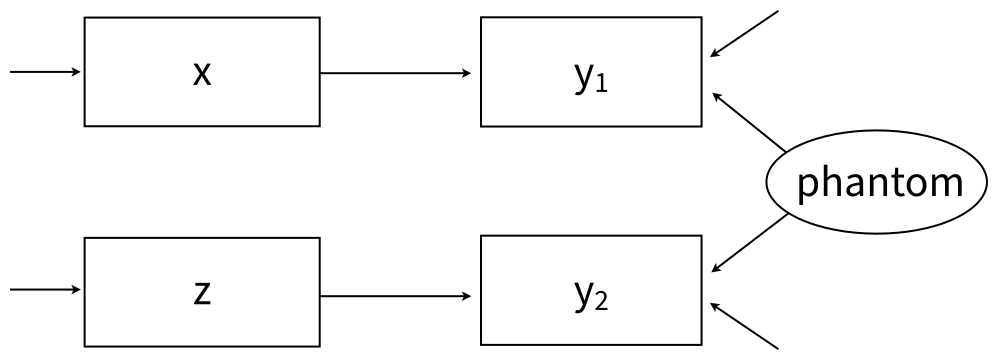
The phantom variable approach can be manually specified by listing the use_phantom keyword on the OPTIONS line. Beyond invoking a separation strategy prior specification, we generally do not recommend this approach, as it is limited in the number of variables it can accommodate.
2.19.6 Parameter Constraints
Blimp allows for many types of parameter constraints. These restrictions are imposed by listing the @ symbol and a numeric value or label following a variable’s name. For example, the following code block uses a label “beta” to specify an equality constraint on x1 and x2’s regression slopes.
MODEL: y ~ x1@beta x2@beta x3;As a second example, the code below uses a numeric label to fix the regression intercept to zero during estimation.
MODEL: y ~ 1@0 x1 x2;Similarly, the code below fixes the variance of a variable to one during estimation.
MODEL:
  y ~ x1 x2;
  y@1;
As a final example, the code below constrains two variances to equality.
MODEL:
  y1 ~ x1 x2;
  y2 ~ x1 x2;
  y1@resvar;
  y2@resvar;
Many, but not all model parameters can be constrained. For example, between-group constraints are not permissible when using BYGROUP processing.
2.19.7 Auxiliary Variables
Blimp uses a sequential specification to incorporate auxiliary variables into a model. Associations among the auxiliary variables and analysis variables follow the same cascading pattern of univariate models used to connect regressors; the first auxiliary is regressed on the analysis variables, the second auxiliary variable is regressed on the first plus the analysis variables, the third is regressed on the first two, and so on. The code block below illustrates a multiple regression analysis with three auxiliary variables, A1 to A3.
MODEL:
  y ~ x1 x2;
  a1 ~ y x1 x2;
  a2 ~ a1 y x1 x2;
  a3 ~ a1 a2 y x1 x2;
The auxiliary models can be specified more succinctly by listing all auxiliary variables on the left side of the same tilde.
MODEL:
  y ~ x1 x2;
  a3 a2 a1 ~ y x1 x2;
2.19.8 Latent Variables
The LATENT command described earlier defines latent variables (e.g., factors in a measurement model) referenced in the MODEL section. To illustrate, the following code block shows a basic measurement model with a single latent variable called yfactorwith three indicators.
LATENT: yfactor;
MODEL: yfactor -> y1:y3;
By default, Blimp establishes identification by fixing the first factor loading to one and the latent mean (or intercept) to zero. The following code block uses univariate regression equations to achieve an identical specification.
LATENT: yfactor;
MODEL:
  yfactor ~ 1@0;
  y1 ~ yfactor@1;
  y2 ~ yfactor;
  y3 ~ yfactor;
It may be beneficial to override the default identification settings in some cases. For example, convergence speed may be improved by scaling the latent factor to an indicator with complete data (or the indicator with the least amount of missing data) or fixing one of the regression intercepts instead of the latent mean to zero. To illustrate, the code block below illustrates a specification with the following features: (a) y1’s loading is freely estimated, (b) the latent mean is estimated, (c) y3’s measurement intercept is constrained to one, and (d) y3’s loading is constrained to one.
LATENT: yfactor;
MODEL:
  yfactor ~ 1;
  y1 ~ yfactor;
  y2 ~ yfactor;
  y3 ~ 1@0 yfactor@1;
Blimp’s univariate modeling framework treats latent factors as incomplete variables to be imputed (adding the savelatent keyword to the OPTIONS line saves the estimated latent scores to the imputed data sets). Imputing the latent scores opens up interesting opportunities not available in other software packages. For example, Blimp allows a latent variable to interact with a manifest variable or with another latent variable (Keller, 2025). The following code block illustrates a latent-by-manifest variable interaction.
LATENT: xfactor;
MODEL:
  xfactor -> x1:x3;
  y ~ xfactor z xfactor*z;
The manifest variable z could have any metric that Blimp supports. Similarly, two latent variables can interact with one another. The following code block illustrates a latent-by-latent interaction involving two latent variables (xfactorand mfactor) with three indicators each.
LATENT: xfactor mfactor;
MODEL:
  xfactor -> x1:x3;
  zfactor -> z1:z3;
  y ~ xfactor zfactor xfactor*zfactor;
Finally, an outcome variable (manifest or latent) can be a polynomial function of a latent variable. The code below shows a latent variable called xfactorwith a quadratic effect on the outcome.
LATENT: xfactor;
MODEL:
  xfactor -> x1:x3;
  y ~ xfactor (xfactor^2) z;
2.19.9 Multilevel Regression Models
Blimp provides two ways to estimate multilevel models. The first parallels mixed model specification in programs like Stata and R packages like lmer. The second uses explicit level-2 latent variables to represent random effects, consisitent with multilevel structural equation modeling (MLSEM). This section details the mixed model specification. Examples in Chapter 6 illustrate the MLSEM approach.
Multilevel regression models require relatively few additional specifications beyond those for single-level regression models. Blimp automatically determines the level at which a variable is measured in a multilevel data set, so the user need only provide a basic model specification. The one exception is latent variables, the levels of which must be specified in the LATENT command. Enders et al. (2020) provide specific details about Blimp’s multilevel modeling framework, which uses the same factored regression specification outlined for single-level models. Predictor variables can be centered at their grand means or group means (Enders & Tofighi, 2007) using the CENTER command. By default, Blimp centers using latent group means (Lüdtke et al., 2008).
Section 1.5 described Blimp’s treatment of incomplete predictors (exogenous variables that do not appear to the left of a tilde (in a path diagram, variables that do not have incoming arrows). When predictors are complete, there is usually no reason to specify a distribution for these variables. Instead, the covariate data essentially function as known constants, as in ordinary least squares. In contrast, incomplete predictors require an explicit distribution for imputation. Blimp allows these distributions to have many forms (e.g., normal, skewed, discrete). In most cases, assigning a distribution to a predictor means making that regressor a dependent variable in its own regression model. These supporting models can be explicitly specified, or Blimp can create them automatically. The situation with predictors is somewhat more complicated in multilevel models because lower-level regressors generally have two sources of variability. The following rules dictate Blimp’s treatment of predictors in multilevel models.
- If any predictor is incomplete, then all predictors are assigned explicit supporting models
- Specifying the
SIMPLEcommand for conditional effects induces an explicit model for all predictors, complete or incomplete. - If all predictors are complete, then they are treated as fixed (no distribution or supporting model), unless group mean centering is requested on the
CENTERINGcommand - Any level-1 predictor variable with group mean centering will have its latent group means estimated via an explicit between-cluster model
- Any level-1 predictor variable with its latent group means referenced using the
.meanfunction will have its means estimated via an explicit between-cluster model - Manifest (arithmetic) group means are available only for complete variables. The group means can be computed as a new variable using the
TRANSFORMcommand (e.g.,xmeans = mean(x, l2id);) - Grand mean centering does not affect whether a predictor variable is automatically assigned a distribution
- If the ICC is exactly zero or nearly zero (e.g., a time variable in a growth model), then no between-cluster model is invoked because such a model would produce an immediate convergence failure (Blimp issues a warning message)
Blimp automatically adds random intercepts residuals to all lower-level models (outcomes or predictors) whenever the CLUSTERID command is used to specify a cluster-level identifier variable. To illustrate, consider a two-level regression model where x1_i and x2_j are level-1 and level-2 predictors, respectively. The following code block illustrates a regression model with random intercepts.
CLUSTERID: level2id;
MODEL: y ~ x1_i x2_j;
The estimated model includes a random intercept in the analysis model as well as in x1_i’s supporting model. In some cases, it may be necessary to manually reference the random intercept (e.g., when labeling or constraining the parameter). In the code block below, the 1 to the right of the vertical pipe represents a random intercept.
CLUSTERID: level2id;
MODEL: y ~ x1_i x2_j | 1;
Random slope coefficients are specified by listing lower-level predictors to the right of a vertical pipe. For example, the code block below illustrates a regression model with random intercepts (implicit) and a random slope for the level-1 predictor x1_i.
CLUSTERID: level2id;
MODEL: y ~ x1_i x2_j | x1_i;
Blimp estimates an unstructured variance–covariance matrix for the random intercepts and random slopes.
Random intercepts and slopes can also appear as regressors in other equations. To illustrate, the code block below uses the RANDOMEFFECT command to define the intercepts and slopes as cluster-level latent variables that predict another variable z.
CLUSTERID: level2id;
RANDOMEFFECT:
ranicepts = y | 1 [level2id];
ranslopes = y | x1_i [level2id];
MODEL:
  y ~ x1_i x2_j | x1_i;
  z ~ ranicepts ranslopes;
Blimp can also estimate three-level models. To illustrate, consider a three-level model where x1_i and x2_j are level-1 and level-2 regressors, respectively, and x3_k is a level-3 predictor. As before, Blimp automatically detects the level at which a variable is measured. The following code block illustrates a three-level regression model with random intercepts induced by a pair of cluster-level identifier variables.
CLUSTERID: level2id level3id;
MODEL: y ~ x1_i x2_j x3_k;
As a second example, the code block below illustrates a three-level random slope model where the influence of the level-1 regressor x1_i varies across level-2 and level-3 units and the influence of the level-2 predictor x2_j varies across level-3 units.
CLUSTERID: level2id level3id;
MODEL: y ~ x1_i x2_j x3_k | x1_i x2_j;
By default, Blimp estimates an unstructured variance-covariance matrix of the random effects at all higher levels of the data hierarchy.
In some situations, it is desirable or necessary to override Blimp’s default behavior and fix certain variance components to zero (or alternatively, select which variances get estimated). This is achieved by listing the desired random effects on the right side of the vertical pipe and appending to the effect’s name a cluster-level identifier in square brackets. To illustrate, the following code block illustrates a three-level model with random intercepts at both levels and a random coefficient for x1_i at the second level.
CLUSTERID: level2id level3id;
MODEL: y ~ x1_i x2_j x3_k | 1[level2id] 1[level3id] x1[level2id];
The resulting variance–covariance matrix at level-2 is an unstructured 2 × 2 matrix, and the level-3 covariance matrix reduces to a scalar with only a random intercept variance. When using this specification, omitting a random effect from the right side of the vertical pipe implicitly sets its variance and covariances to zero.
Multilevel regression models can also include cluster means as group-level predictors (i.e., contextual effects; Longford, 1989; Raudenbush & Bryk, 2002). Appending the .mean keyword to the end of a lower-level covariate’s name references that variable’s latent group means. To illustrate, the following code block specifies a two-level regression model that includes x1_i as a level-1 predictor and its latent group means as a level-2 predictor.
CLUSTERID: level2id;
MODEL: y ~ x1 x1.mean x2;
Importantly, the group means are cluster-level latent variables rather than deterministic arithmetic averages of the level-1 scores. Methodology research favors a latent variable specification because it can reduce bias associated with arithmetic or “manifest” group means in some scenarios (Hamaker & Muthén, 2019; Lüdtke et al., 2008).
In a three-level model, appending the .mean suffix to a level-1 predictor automatically introduces the level-2 and level-3 latent group means as predictors. To specify the group means at one level but not the other, additionally append the cluster-level identifier variable in square brackets. For example, the following code block illustrates a three-level random intercept regression with x1’s level-3 latent group means as a predictor but not its level-2 averages.
CLUSTERID: level2id level3id;
MODEL: y ~ x1 x1.mean[level3id] x2 x3;
2.19.10 Lagged (Dynamic) Effects
BLIMP offers built-in functions for incorporating lagged predictors in a multilevel model, where the lagged variable shifts each person’s data record down by one row (i.e., the first y measurement appears in the second row, the second y measurement in the third row, and so on). The lagged variable has a missing value in the first row because it is not observed prior to the initial measurement.
A lagged predictor is specified by appending .lag to a variable’s name in the MODEL section. Lagged effects in multilevel models introduce a special dependency structure because an observed variable and its lagged version are inherently linked. For example, they must share the same underlying imputations, since the lag is a deterministic function of the original variable rather than an independently generated quantity.
Lagged variables require the TIMEID command described in Chapter 2. TIMEID specifies an occasion-level identifier that indexes measurement occasions within clusters. When a TIMEID variable is provided in conjunction with a lagged (dynamic) effect, Blimp uses it to organize the data into a time-balanced format by ensuring that each cluster has one row per occasion, inserting rows with missing values when occasions are absent (Asparouhov, Hamaker, & Muthén, 2018). This restructuring allows lagged variables to be computed consistently across clusters, even when the original data are unbalanced or irregularly spaced. The TIMEID variable should uniquely identify the occasion within each cluster and reflect the intended temporal ordering.
The primary application of lagged predictors is a dynamic structural equation model (DSEM), although they are also used in certain MNAR models (e.g., Example 7.10). To illustrate, the example below illustrates a very simple dynamic structural equation model (DSEM) where y_i is predicted by its “pure” within-person lag.
\[y_{ij}=\mu_{y_j}+\beta_1(\operatorname{lag}(y_{ij})-\mu_{y_j})+\varepsilon_{ij}\]
The Blimp syntax for the model is shown below.
DATA: data.dat;
VARIABLES: y_i x_i w1_j w2_j level2id time;
CLUSTERID: level2id;
TIMEID: time;
MISSING: 999;
LATENT: level2id = ymean_j;
MODEL:
  ymean_j ~ 1;
  y_i ~ 1@ymean_j (y_i.lag - ymean_j);
SEED: 90291;
BURN: 10000;
ITER: 10000;
In the MODEL command, y_i is the level-1 outcome variable, and y_i.lag denotes its lagged value. The term (y_i.lag − ymean_) group-mean centers the lagged predictor by subtracting the level-2 random intercept. This is an example of a function embedded within an equation discussed in the next section. Examples in Chapter 6 describe more complex DSEM applications with lagged predictors, and examples in Chapter 7 use lagged variables in a multilevel Diggle–Kenward (1994) model for MNAR missingness.
2.19.11 Functions Embedded in Equations
Blimp allows users to embed functions inside parentheses on the right side of regression equations and, in limited cases, on the left side as well. Complex embedded functions can be simplified with definition variables, which are discussed in a subsequent section.
As a simple example of an embedded function, the following code block features a predictor centered at a constant value of 10. The TRANSFORM command could be used to a new centered variable in the data, but the example below embeds that operation directly into the regression equation as a predictor.
MODEL: y ~ (x1 - 10);Similarly, the next example shows a log-transformed predictor variable.
MODEL: y ~ ln(x1);Interaction and online effects are an important example of embedded functions. The example below shows an interaction involving x and C and a quadratic effect of x on y.
MODEL:
  m ~ x c x*c;
  y ~ x (x^2) c m;
Another example of embedded functions involves group mean centering. For example, the dynamic structural equation model (DSEM) below centers a lagged outcome y_i.lag at its random intercept (latent group mean), ymean_j.
MODEL:
  ymean_j ~ 1;
  y_i ~ 1@ymean_j (y_i.lag - ymean_j);
Boolean operators (true/false functions) were described in the TRANSFORM section as a way to recode an existing variable into a new variable. Boolean operators can also be used to define predictors in a regression equation. For example, the code block below uses a Boolean operator to create a dummy variable where x >= 50 = 1 and x < 50 = 0.
MODEL: y ~ (x >= 50);Note that variables created with TRANSFORM are saved to the imputed data sets, whereas variables created via inline functions are not. When x has missing values, the continuous version of the variable links to other predictors, whereas the discrete version predicts y. The imputation algorithm uses a Metropolis sampling step that allows x to simultaneously function as a continuous and binary variable.
Embedded functions can also reference multiple variables. A sum score is an important example. For example, the following code block defines the predictor variable as the sum of four ordinal variables (e.g., questionnaire items).
ORDINAL: x1:x4;
MODEL: y ~ (x1 + x2 + x3 + x4);
For sequentially ordered variables, an equivalent specification uses the summation operator :+: between the first and last variable, as follows.
ORDINAL: x1:x4;
MODEL: y ~ x1:+:x4;
Importantly, the embedded sum function does not define a deterministic computation or passive imputation. Rather, the sum is essentially an auxiliary variable that varies as a function of its four components (e.g., items). Any missing data handling uses a Metropolis sampling step to impute the individual components while simultaneously accounting for the fact that the incomplete component is part of a larger summation. The procedure for treating missing components of a sum score is described in Alacam, Enders, Du, and Keller (2023).
Embedded functions can also combine multiple operations. To illustrate, the following code block shows an interaction between a sum score and a numeric variable m. Complex embedded functions like the one above can also be simplified with definition variables, which are discussed in the next section.
ORDINAL: x1:x4;
MODEL: y ~ x1:+:x4 m (( x1:+:x4 ) * m);
Blimp also allows embedded functions on the left side of the tilde, but the range of allowable functions is limited (e.g., to basic mathematical operations and transformations). Moreover, the embedded function can only reference a single (dependent) variable. As a simple example, the following code centers the outcome variable at a constant value of 5.
MODEL: (y - 5) ~ x1 x2 x3;A common application of this functionality involves transformations to a skewed outcome variable. As an example, the following code block applies a natural log transformation to a positively-valued dependent variable.
MODEL: ln(y) ~ x1 x2 x3;As a second example, the code below applies the Yeo–Johnson (Yeo & Johnson, 2000) transformation to a skewed outcome variable that is centered at a value of 5.
MODEL: yjt(y - 5) ~ x1 x2 x3;The Yeo–Johnson procedure estimates the shape of the data as the MCMC algorithm iterates and produces imputations from a skewed distribution. Examples 4.19, 4.20, and 5.11 illustrate the Yeo–Johnson transformation.
2.19.12 Residualized Effects as Predictors
Residualized variables are a special application of embedded functions that are particularly useful in longitudinal applications. One such application is a growth curve model with an AR1 structure on its level-1 residuals (see Example 5.18). Another application is the random intercept cross-lagged panel model (Hamaker, Kuiper, & Grasman, 2015), which features pure within-person effects among residual latent variables (see Example 5.19). Complex residual functions can be simplified with definition variables, which are discussed in the next section.
To illustrate how to include a residualized predictor, the code block below shows a simple regression where y1 is regressed on x1. The intercept and slope in this equation are labeled using @b0 and @b1. On the second line, y2 is regressed on the y1’s residual, which is an embedded function that uses the labels to compute y1’s predicted value, b0 + (x1*b1).
MODEL:
  y1 ~ 1@b0 x1@b1;
  y2 ~ (y1 - (b0 + (x1*b1)));
As a second example, a random intercept cross-lagged panel model features associations among residualized repeated measurements, where the effect of the random intercept capturing stable person-level variation is removed. The code block below shows the core building blocks. The example below features y2 regressed on the y1’s residual, which is computed by subtracting the sum of its mean and the person-specific random intercept, y1 - (muy1 + ranicept). Similarly, y3 is regressed on y2’s residual.
LATENT: ranicept;
MODEL:
  ranicept ~ 1@0;
  y1 ~ 1@mu1 ranicept@1;
  y2 ~ 1@mu2 ranicept@1 (y1 - (muy1 + ranicept));
  y3 ~ 1@mu3 ranicept@1 (y2 - (muy2 + ranicept));
Section 5.19 includes several applications of the random intercept cross-lagged panel models from Mulder and Hamaker (2021).
2.19.13 Definition Variables
Definition variables provide a flexible way to embed computations directly into model equations. They function as symbolic substitutions that define algebraic computations, which can then be used as predictors in regressions equations. Importantly, definition variables not new variables with their own models and distributions. Rather, they simply serve as shorthand that Blimp substitutes into the regression equations, making the specification more compact.
The previous section illustrated sum functions as predictor variables. The example below shows an interaction between a sum score and a numeric variable m.
ORDINAL: x1:x4;
MODEL: y ~ x1:+:x4 m (( x1:+:x4 ) * m);
The model can be specified more clearly by defining the sum score as a definition variable named xsum as follows.
ORDINAL: x1:x4;
MODEL:
  xsum = x1:+:x4;
  y ~ xsum m xsum*m;
The example below shows an interaction between a pair of sum scores, each as a definition variable, xsum and msum.
ORDINAL: x1:x4;
MODEL:
  xsum = x1:+:x4;
  msum = m1:+:m6;
  y ~ xsum msum xsum*msum;
The previous section illustrated how group mean centering could be implemented as an embedded function in a DSEM. The example below uses a definition variable ylag_cent that references the centered predictor.
MODEL:
  ylag_cent = y_i.lag - ymean_j;
  ymean_j ~ 1;
  y_i ~ 1@ymean_j ylag_cent;
Similarly, the example below creates a definition variable x_dummy that references the Boolean variable with x >= 50 = 1 and x < 50 = 0.
MODEL: x_dummy = (x >= 50) y ~ x_dummy;Definition variables can also be used to streamline specification of random intercept cross-lagged panel models. The previous section illustrated a model featuring y2 regressed on the y1’s residual and y3 regressed on y2’s residual. The code block below uses definition variables to represent the residualized predictors.
LATENT: ranicept;
MODEL:
  y1_residual = y1 - (muy1 + ranicept);
  y2_residual = y2 - (muy2 + ranicept);
  ranicept ~ 1@0;
  y1 ~ 1@mu1 ranicept@1;
  y2 ~ 1@mu2 ranicept@1 y1_residual;
  y3 ~ 1@mu3 ranicept@1 y2_residual;
2.19.14 Looping Structures
BLIMP provides a looping structure within the MODEL command that allows repetitive features of a model to be specified more concisely in fewer lines of code. Looping functionality is available in the MODEL, TRANSFORM, SIMULATE, PARAMETERS, and WALDTEST commands. Examples 5.8, 5.18, 5.19, and 6.24 show how to use looping structures to streamline model specification.
To illustrate a basic example, consider a model consisting of five outcome variables (y1 to y5) that are each regressed on a common predictor x. Using standard syntax, each regression path is written on a separate line, as follows.
MODEL:
  y1 ~ x;
  y2 ~ x;
  y3 ~ x;
  y4 ~ x;
  y5 ~ x;
The five separate lines of syntax shown above can be reduced to a single line using the looping syntax shown in the code block below. An iteration index i is defined inside curly braces and assigned a numeric range (e.g., 1:5). The code loops through these values, substituting the numeric index inside square brackets, generating the full set of model statements automatically.
MODEL: { i in 1:5 } : y[i] ~ x;Variables used in looping expressions need not have numeric suffixes in their names. Instead of a numeric range, the iterator can be defined over a list of variable names. To illustrate a basic example, consider a model consisting of four outcome variables (V, W, y, and z) that are each regressed on a common predictor x. Using standard syntax, each regression path is written on a separate line, as follows.
MODEL:
  v ~ x;
  w ~ x;
  y ~ x;
  z ~ x;
The four separate lines of syntax shown above can be reduced to a single line using the looping syntax shown below.
MODEL: { var in v w y z } : [var] ~ x;Here, the iteration variable var is defined inside curly braces and assigned a space-separated list of variable names. The loop iterates over the list, and each occurrence of the iteration index inside square brackets is replaced with the corresponding variable name, automatically generating the full set of model statements.
Looping expressions are not limited to a single iteration index and can include two or more indices. When multiple iterators are specified, BLIMP expands the loop over all combinations of their values, allowing complex model structures to be defined compactly. To illustrate, consider a cross-lagged panel model with two repeated measures variables, x and y, measured at four time points. At each wave, both variables are regressed on their own lagged value and the lagged value of the other variable. Using standard MODEL syntax, each regression must be written explicitly, as follows..
MODEL:
  y1 ~ y0 x0;
  x1 ~ y0 x0;
  y2 ~ y1 x1;
  x2 ~ y1 x1;
  y3 ~ y2 x2;
  x3 ~ y2 x2;
The same model can be specified more concisely using looping syntax with two iteration indices, one labeled t indexing time and one labeled var indexing the variables.
MODEL: { t in 1:3, var in y x } : [var][t] ~ y[t-1] x[t-1];Here, the iterator t indexes time points, while the iterator var cycles over the variable names y and x. The loop substitutes these values inside square brackets and expands the single line into the full set of cross-lagged regression equations shown above.
2.20 SIMPLE Command
The SIMPLE command is used to request conditional effects (e.g., simple intercepts and simple slopes) from a regression model with an interaction effect. When using rblimp, thesimple_plot function can be used to graph simple intercepts and slopes from a model with an interaction, and the jn_plot function produces Johnson–Neyman regions of significance.
At each MCMC iteration, Blimp computes conditional effects by applying an appropriate contrast vector to the analysis model’s regression coefficients. These additional auxiliary parameters thus have their own distribution, credible intervals, et cetera. The PARAMETERS command described next can also be used to compute contrasts.
The code block below shows the basic specification where the SIMPLE command requests the conditional effects of x (the focal predictor) at different values of m (the moderator).
CENTER: x m;
MODEL: y ~ x m x*m;
SIMPLE: x | m;
Multiple sets of conditional effects can be separated by semicolons
CENTER: x m;
MODEL: y ~ x m x*m;
SIMPLE: x | m; m | x;
or listed on separate lines, as follows.
CENTER: x m;
MODEL: y ~ x m x*m;
SIMPLE:
x | m;
m | x;
When a continuous moderator is listed to the right of the vertical pipe, Blimp automatically reports conditional effects at zero and plus or minus one standard deviation from zero. In a multilevel model, the standard deviation is determined by the type of centering. A continuous moderator centered at its group means has only within-cluster variation, so the pooled within-cluster standard deviation is used. A continuous moderator centered at its grand mean has both within-cluster and between-cluster variation, so the total standard deviation is used.
Using standard deviation units as evaluation points can be problematic when the moderator is highly skewed, because those values may fall outside the observed range of the data (Hayes, 2022). As an alternative, conditional effects can be evaluated at the 16th, 50th, and 84th percentiles of the moderator, which correspond approximately to standard deviation units under normality. Appending @quantile after the moderator’s name requests this set of evaluation points.
CENTER: x m;
MODEL: y ~ x m x*m;
SIMPLE: x | m@quantile;
Blimp can also evaluate conditional effects at the 25th, 50th, and 75th percentiles of the moderator by replacing the quantile keyword with quartile.
CENTER: x m;
MODEL: y ~ x m x*m;
SIMPLE: x | m@quartile;
When a discrete moderator variable is listed to the right of the vertical pipe (a variable listed on the NOMINAL or ORDINALcommand), Blimp automatically computes and reports conditional effects for every category.
The SIMPLE command also allows users to specify their own pick-a-point score values. To illustrate, the following code block specifies conditional effects at m = 0 and m = 1. The same method identifies specific points for continuous moderators.
CENTER: x m;
MODEL: y ~ x m x*m;
SIMPLE:
x | m@0;
x | m@1;
Different numbers of standard deviation units can also be specified. For example, the code block below requests the simple slopes of x at one half of a standard deviation above and below the mean of m.
CENTER: x m;
MODEL: y ~ x m x*m;
SIMPLE:
x | m@.5SD;
x | m@-.5SD;
The SIMPLE command can also condition on more than one moderator by joining them with and to the right of the vertical pipe. In this case, Blimp computes conditional effects at every combination of the moderators’ values. For example, the code block below specifies a three-way interaction and requests the simple slopes of x at three levels each of m and z (the mean and one standard deviation above and below the mean), producing nine sets of coefficients.
CENTER: x m z;
MODEL: y ~ x m z x*m x*z m*z x*m*z;
SIMPLE: x | m and z;
When using rblimp, the simple_plot function can be used to graph simple intercepts and slopes from the simple command, and the jn_plot function produces Johnson–Neyman regions of significance. The plotting syntax for a continuous moderator is shown below, where x and m are the focal predictor and moderator, respectively. The jn_plot function is only available for continuous moderators, but the simple_plot function allows continuous and discrete moderators.
simple_plot(y ~ x | m, mymodel)
jn_plot(y ~ x | m, mymodel)
2.21 PARAMETERS Command
The PARAMETERS command is used to (a) define auxiliary parameters that are functions of a model’s estimated parameters, and (b) specify custom prior distributions. The command uses the same mathematical operators and accesses the same functions as the TRANSFORM command described earlier. Section 2.1 gives a complete list of the available functions.
2.21.1 Auxiliary Parameters
Auxiliary parameters are computed by attaching alphanumeric labels to model parameters, then using those labels in an equation that defines a new parameter. Auxiliary parameters are computed at every MCMC iteration, and thus they have their own distributions and summary tables in the output.
As a first example, consider a regression equation where d is regressed on a binary dummy code d. The code below below attaches labels to the intercept and slope (@icept and @diff), then it uses those labels in the PARAMETERS section to define the group means and standardized mean difference effect size as auxiliary parameters. The .totalvar function is described in Section 2.2.
ORDINAL: d;
MODEL: y ~ 1@icept d@diff;
PARAMETERS:
  mean_d0 = icept;
  mean_d1 = icept + diff;
  cohend = diff / sqrt(y.totalvar);
As a second example, the following code block labels the three slope coefficients in a moderated regression model and uses the PARAMETERS command to compute the conditional effect of x (i.e., simple slope) at values of m = 0 and m = 1.
CENTER: x;
MODEL: y ~ x@beta1 m@beta2 x*m@beta3;
PARAMETERS:
  m0 = 0;
  m1 = 1;
  slope.at.m0 = beta1 + m0 * beta3;
  slope.at.m1 = beta1 + m1 * beta3;
As a final example, the code block below labels pathways from a single-mediator model and uses the PARAMETERS command to compute the product of coefficients estimator (i.e., the product of the x to m and m to y paths; Mackinnon, 2008).
MODEL:
  m ~ x@apath;
  y ~ x m@bpath;
PARAMETERS: indirect = apath * bpath;
2.21.2 Looping Structures
BLIMP provides a looping structure within the PARAMETERS command that allows repetitive features of a model more concisely in fewer lines of code. Looping functionality is available in the MODEL, TRANSFORM, SIMULATE, PARAMETERS, and WALDTEST commands. Examples 5.8, 5.18, 5.19, and 6.24 show how to use looping structures to streamline model specification.
To illustrate, the following excerpt is from Example 5.8, which is a confirmatory factor analysis with binary indicators. The PARAMETERS command is used to convert the measurement intercepts and factor loadings into IRT discrimination and difficulty parameters.
MODEL:
  ability ~ 1@0;
  ability@1;
  logit(y1) ~ 1@icept1 ability@load1;
  logit(y2) ~ 1@icept2 ability@load2;
  logit(y3) ~ 1@icept3 ability@load3;
  logit(y4) ~ 1@icept4 ability@load4;
  logit(y5) ~ 1@icept5 ability@load5;
  logit(y6) ~ 1@icept6 ability@load6;
PARAMETERS:
  discrim1 = load1;
  discrim2 = load2;
  discrim3 = load3;
  discrim4 = load4;
  discrim5 = load5;
  discrim6 = load6;
  difficulty1 = - icept1 / load1;
  difficulty2 = - icept2 / load2;
  difficulty3 = - icept3 / load3;
  difficulty4 = - icept4 / load4;
  difficulty5 = - icept5 / load5;
  difficulty6 = - icept6 / load6;
The PARAMETERS section of the script can be specified more concisely as follows.
PARAMETERS:
  { i in 1:6 } : discrim[i] = load[i];
  { i in 1:6 } : difficulty[i] = - icept[i] / load[i];
The loop indexed by i ranges from 1 to 6, corresponding to the six observed variables y1 through y6. The first loop relabels each factor loading as a discrimination parameter (discrim[i]). The second loop computes item difficulty parameters (difficulty[i]) as a function of the corresponding intercept and loading. Together, these loops automatically generate six discrimination and six difficulty parameters without requiring each definition to be written explicitly.
2.21.3 Custom Prior Distributions
The second major use for the PARAMETERS command is to introduce custom prior distributions. This functionality is currently restricted to the following list of univariate prior distributions.
normal(mu, var) or N(mu, var)= normal distribution withmuas the mean andvaras the varianceinvgamma(a, b)= inverse gamma distribution witha= scale (i.e., alpha; prior degrees of freedom ÷ 2) and b = shape (i.e., beta; prior sums of squares ÷ 2)gamma(k, theta)= gamma distribution withk= shape andtheta= scaleuniform(a, b) or unif(a, b)= uniform distribution with lower boundaand upper boundb.Note that-InforInfare not permissible arguments.beta(a, b)= beta distribution witha= alpha andb= betalaplace(mu, b)= laplace distribution withmu= location andb= scalecauchy(a, g)= cauchy distribution witha= location andg= scaletruncate(a, b) or trunc(a, b)= truncate function to generate truncated distributions witha= lower bound andb= upper bound. To obtain one sided truncation, you can set either parameter to-InforInffor positive and negative infinity.
To illustrate, the following code block shows a simple regression model with informative normal priors on the regression coefficients and an inverse gamma prior for the variance with a = 1 and b = .5 (i.e., 2 additional degrees of freedom and unit sum of squares). This prior specification for the variance is identical to listing prior1 on the OPTIONS line.
MODEL:
  y ~ 1@beta0prior x@beta1prior;
  y@resvarprior;
PARAMETERS:
  beta0prior ~ normal(2,20);
  beta1prior ~ normal(5,10);
  resvarprior ~ invgamma(1,.5);
2.22 WALDTEST Command
Although MCMC estimation is grounded in the Bayesian statistical paradigm, one can also view posterior medians, standard deviations, and credible intervals as surrogates for frequentist point estimates, standard errors, and confidence intervals. Levy and McNeish (2023) describe this perspective as “computational frequentism”. Essentially, the researcher wants to operate within the frequentist framework, but they use MCMC to solve a difficult estimation problem. Missing data analyses are a compelling use case for computational frequentism because optimal likelihood-based solutions are not always available or easy to use. To facilitate this perspective, the WALDTESTcommand implements custom significance tests via the Bayesian Wald test described by Asparouhov and Muthén (2021).
The Wald test statistic is a chi-square variable measuring the sum of squared, standardized differences between the point estimates (posterior means) and the null hypothesis values. The test’s degrees of freedom equals the number of parameters or constraints being evaluated. The chi-square is an MCMC-generated estimate of a frequentist test statistic, and the p-value is the area above the test statistic value in a central chi-square distribution. As such, the test can be used for frequentist inference. By default, Blimp prints univariate Wald tests for all parameters except variances and variance explained test statistics.
The WALDTESTcommand provides multiple ways to specify custom hypotheses. One approach is to label parameters in the MODEL statement and use the WALDTESTcommand to specify the null hypothesis or condition to be evaluated. The example below illustrates a test of whether two slopes simultaneously equal 0.
MODEL: y ~ x1@b1 x2@b2 x3@b3;
WALDTEST:
b1 = 0;
b2 = 0;
Tests of multiple parameters can also be specified using the following shortcut.
MODEL: y ~ x1@b1 x2@b2 x3@b3;
WALDTEST: b1:b3 = 0;
More than one test can be performed by specifying multiple WALDTEST commands. For example, the following code block yields two tests, the first of which involves a single parameter, the second of which involves two slopes.
MODEL: y ~ x1@b1 x2@b2 x3@b3;
WALDTEST: b1 = 0;
WALDTEST: b2:b3 = 0;
In rblimp, multiple tests are specified as elements in a list, as follows.
waldtest = list('b1 = 0','b2:b3 = 0')The WALDTESTcommand can also evaluate equality and other types of constraints. For example, the following code block tests an equality constraint on two regression slopes.
MODEL: y ~ x1@b1 x2@b2 x3@b3;
WALDTEST: b1 = b2;
Complex hypotheses are specified by listing multiple conditions in a single WALDTEST command. For example, the following code block evaluates whether one slope differs from 0 and whether two slopes differ from one another.
MODEL: y ~ x1@b1 x2@b2 x3@b3;
WALDTEST:
b1 = b2;
b3 = 0;
The second way to implement the WALDTESTcommand is similar to the MODEL statement—it specifies a regression model. However, the model listed on the WALDTESTline must be nested within the model listed on the MODEL statement. The first way to specify the nested model is to exclude parameters from the nested model. The code block below illustrates a comparison involving a full model with three predictors and a restricted model with only an intercept.
MODEL: y ~ x1 x2 x3;
WALDTEST: y ~ 1;
Alternatively, a nested model can be specified by fixing parameters to desired test values by appending an @ and a numeric label to a variable or effect. For example, the following code block illustrates an equivalent specification that fixes three slope coefficients to one.
MODEL: y ~ x1 x2 x3;
WALDTEST: y ~ x1@0 x2@0 x3@0;
The WALDTESTcommand produces the output table below.
MODEL FIT:

Asparouhov & Muthén Wald Tests

Test #1

  Wald Statistic (Chi-Square)                 133.705
  Number of Parameters Tested (df)                  3
  Probability                                   0.000
The WALDTEST command can also compare nested models with different variances. To illustrate, the code block below shows a two-level model with random coefficients, where the WALDTEST command is used to specify a random intercept model with two fewer parameters.
CLUSTERID: level2id;
MODEL: y ~ x1 x2 x3 | x1;
WALDTEST: y ~ x1 x2 x3 | x1@0;
2.22.1 Looping Structures
BLIMP provides a looping structure within the WALDTEST command that allows repetitive features of a model more concisely in fewer lines of code. Looping functionality is available in the MODEL, TRANSFORM, SIMULATE, PARAMETERS, and WALDTEST commands. Examples 5.8, 5.18, 5.19, and 6.24 show how to use looping structures to streamline model specification.
To illustrate, consider a model with five regression coefficients, labeled beta1 through beta5. Using standard WALDTEST syntax, a test with five degrees of freedom is specified by listing each component hypothesis separately.
WALDTEST:
beta1 = 0;
beta2 = 0;
beta3 = 0;
beta4 = 0;
beta5 = 0;
The WALDTEST section of the script can be specified more concisely as follows.
WALDTEST: { i in 1:5 } : beta[i] = 0;Here, the loop index i ranges from 1 to 5 and is substituted into the parameter name beta[i], automatically generating one null hypothesis per slope coefficient in a single line of code.
2.23 FCS Command
Separate from its data analytic core, Blimp continues to offer the fully conditional specification routines introduced in Version 1. Blimp’s implementation of fully conditional specification parallels van Buuren’s popular MICE program (van Buuren, 2007; van Buuren, Brand, Groothuis-Oudshoorn, & Rubin, 2006), but it uses latent response variable framework to treat categorical variables and uses latent group means to preserve multilevel data structures. Enders (2022) describes fully conditional specification with latent variables.
The FCS command cannot be used in conjunction with the MODEL command. Rather, FCS deploys an MCMC algorithm that cycles through incomplete variables one at a time, imputing each variable from an additive equation that features the incomplete variable regressed on all other variables listed on the FCS line. This algorithm makes no distinction between outcomes and regressors in the subsequent analysis model; all entities listed on the FCS line are simply variables to be imputed or complete variables that contribute to imputation. The SAVE command outputs the filled-in data sets for reanalysis using frequentist methods (Rubin, 1987). FCS is known to introduce bias when applied to analysis models with nonlinear terms such as interactions, polynomial effects, or random coefficients. The model-based imputation routines illustrated in Chapters 4 through 7 are far superior.
To illustrate the FCS command, consider a simple scenario with one continuous variable x, one binary dummy variable d, and one 7-category ordinal variable o. The code block below shows a basic script (which could also include nominal variables).
DATA: data.dat;
VARIABLES: id a1:a5 x d o z;
ORDINAL: d o;
MISSING: 999;
FCS: x d o;
NIMPS: 20;
BURN: 10000;
ITER: 10000;
OPTIONS: savelatent;
SAVE: stacked = imps.dat;
At a minimum, the FCS command should include all variables and effects of interest in the analysis model(s), but the list may also include additional auxiliary variables. The commands following the FCS line in the script are described later in this section. By default, Blimp uses four independent MCMC chains, so you would always request a multiple of that to ensure that each MCMC chain contributes the same number of filled-in data sets. In this example, requesting 20 imputations would select five data sets from each chain at equal intervals across the post-burn-in iterations.
Blimp’s FCS–MI routine primarily differs from the classic MICE approach in two ways. First, Blimp’s algorithm is a true Gibbs sampler; this is a small technical nuance that makes no difference in practice. Second, Blimp adopts a fully latent specification for all categorical variables. As noted previously, Blimp uses a probit regression framework that views discrete scores as arising from one or more normally distributed latent response variables (or latent response difference scores in the case of multicategorical nominal variables). Applied to the previous example, the binary dummy variable d and the 7-category ordinal variable o have corresponding latent response variables d* and o*, respectively. Blimp’s FCS–MI routine uses the latent variables both as predictors and as outcomes. The round robin imputation models for this example are as follows.
\[x=\mu_x+\gamma_{11}\left(d^*-\mu_{d^*}\right)+\gamma_{21}\left(o^*-\mu_{o^*}\right)+r_1\]
\[d^*=\mu_{d^*}+\gamma_{12}\left(o^*-\mu_{o^*}\right)+\gamma_{22}\left(x-\mu_x\right)+r_2\]
\[o^*=\mu_{o^*}+\gamma_{13}\left(x-\mu_x\right)+\gamma_{23}\left(d^*-\mu_{d^*}\right)+r_3\]
The latent response models also incorporate threshold parameters that divide the latent distributions into discrete segments, and the residual variances of r2 and r3 are fixed at one to establish the latent variable metrics.
Listing the savelatent keyword on the OPTIONS line saves both the discrete and latent response variables to the imputed data files (by default, only the discrete imputes are written to the imputed data files). The imputed latent scores (plausible values) could be used in lieu of the discrete scores in a subsequent analysis. For example, the analysis in Section 5.7 illustrates an item-level factor analysis that uses imputed latent response scores. In a similar vein, Muthén and Asparouhov (2016) describe an application that replaces a binary mediator with a latent response variable. As an aside, the savelatent keyword can also be used in conjunction with imputations generated by the MODEL command.
If desired, listing the mice and manifest keywords on the OPTIONS line alters Blimp’s default behaviors and invokes an algorithm that is equivalent to the one in the MICE package in R (van Buuren & Groothuis‐Oudshoorn, 2011). In addition to a slight algorithmic modification, this specification uses discrete variables as predictors on the right side of equations. The round robin imputation models for this example are as follows.
\[x=\gamma_{01}+\gamma_{11}d+\gamma_{21}o+r_1\]
\[d^*=\gamma_{02}+\gamma_{12}o+\gamma_{22}x+r_2\]
\[o^*=\gamma_{03}+\gamma_{13}x+\gamma_{23}d+r_3\]
The MICE package deploys logistic rather than probit models for categorical variables, but this distinction tends to make little difference in practice.
The multilevel version of fully conditional specification (Enders et al., 2018) automatically introduces the latent group means of all lower-level variables in the imputation model (i.e., latent contextual effects); this is true for both continuous and latent response variables. Including the group means in the imputation model allows all between-cluster associations to vary independently of the within-cluster associations. Listing the noclmean keyword on the OPTIONS line removes the latent group means from the regression models, producing a more restrictive imputation model where the within- and between-cluster regressions are assumed to be equal. For two-level models, a heterogeneous level-1 variance structure is invoked by listing the hev keyword on the OPTIONS line. This method is described in Kasim and Raudenbush (1998).
2.24 BURN Command
The BURN command specifies the number of burn-in iterations. Bayesian analysis results summarize estimates taken from iterations following the burn-in period, and multiple imputations (via FCS or MODEL) are saved after the burn-in period. To illustrate, the following code block illustrates a 10,000-iteration burn-in period.
BURN: 10000;The number of burn-in iterations should always be determined by examining the potential scale reduction factor diagnostic (Gelman & Rubin, 1992) from the Blimp output. Material at the beginning of Chapter 3 describes how to use these diagnostics.
2.25 ITER Command
The ITER (also ITERATIONS) command specifies the number of iterations after the burn-in period. The tabular summaries reflect Bayesian analysis results taken from the post burn-in period. To illustrate, the following code block specifies 10,000 MCMC iterations following an initial burn-in period of 10,000 iterations.
BURN: 10000;
ITER: 10000;
Note that the total number of iterations is distributed equally across the number of MCMC chains, the default value of which is four (see the CHAINS command). In our experience, 10,000 iterations is usually more than sufficient, but material at the beginning of Chapter 3 describes how to verify that this is the case.
2.26 SEED Command
The SEED command specifies the random number seed for MCMC estimation. this value must be an integer.
SEED: 90291;2.27 CHAINS Command
The CHAINS command is used to specify the number of MCMC processes (and optionally, the number of processors used for computation). The default number of chains is four, and the total number of computational cycles specified on the ITERline is always divided equally across chains. By default, Blimp attempts to distribute MCMC chains across physical cores, resulting in faster computation (e.g., on a 10-core machine, specifying 10 chains would automatically assign one MCMC process per core). Because Blimp automatically uses the maximum available cores, this specification would primarily be used to specify fewer resources. For example, the code block below specifies 10,000 iterations spread across 10 unique MCMC chains. The MCMC processes are completed sequentially using two physical cores.
ITER: 10000;
CHAINS: 10 processors 2;
By default, each chain will have a different seeding value and different random starting values. Random starting values can be disabled by specifying the norandomstarts keyword on the OPTIONS line.
2.28 NIMPS Command
The NIMPS command is used to specify the desired number of multiple imputation data sets to save during MCMC estimation (saving imputed data sets is optional). Graham, Olchowski, and Gilreath (2007) suggest using at least 20 imputed data sets to maximize power, and other studies have shown that 100 or more imputations may be necessary to reduce the impact of Monte Carlo simulation error on standard errors and get precise estimates of confidence interval half-widths and probability values (Bodner, 2008; Harel, 2007; von Hippel, 2018).
Imputations can be saved at regular intervals during a single MCMC chain, at the final iteration of multiple MCMC processes, or some combination of the two. The code block below saves 10 imputed data sets from the final iteration of 10 MCMC chains, each with 10,000 burn-in iterations and 10,000 post-burn-in iterations.
BURN: 10000;
ITER: 10000;
CHAINS: 10;
NIMPS: 10;
Alternatively, you can save multiple imputations from within the same chain. By default, Blimp uses four independent MCMC chains, so you would always request a multiple of that to ensure that each MCMC chain contributes the same number of filled-in data sets. In this example, requesting 20 imputations would select five data sets from each chain at equal intervals across the post-burn-in iterations.
BURN: 10000;
ITER: 10000;
NIMPS: 20;
2.29 THIN Command
The THIN command is used to specify the between-imputation interval when saving multiple imputations from the same MCMC chain. For example, the following code block deploys four MCMC chains (the default) that create 100 filled-in data sets by saving imputations every 100 iterations after the 10,000-iteration burn-in period. Each post-burn-in chain is assigned 2,500 (¼ of the total) iterations, and each chain produces 25 data sets.
NIMPS: 100;
BURN: 10000;
THIN: 100;
Saving multiple imputations is optional, and this command is not necessary; however, either THIN or ITERmust be specified when saving filled-in data sets. The THIN command has no impact on printed parameter summaries, which are always based on the post burn-in iterations.
2.30 OPTIONS Command
The following keywords are used in conjunction with either the FCS or MODEL commands. Bolded keywords are default and do not require explicit specification.
prior1/prior2/prior3= Three common prior distributions for the residual variances and covariances of dependent variables;prior1is more informative because it adds to the degrees of freedom and sums of squares,prior2is less informative because subtracts from the degrees of freedom, andprior3has zero degrees of freedom and adds zero to the sums of squaresxprior1/xprior2/xprior3= Three common prior distributions for the residual variances of predictor variables with unspecified associationspsr/nopsr= Compute the potential scale reduction factor diagnostichov/hev= homogenous versus heterogeneous within-cluster variancesrandomstarts/norandomstarts= Enable/disable random starting values for different MCMC chainslistwise= Enable listwise deletion (off by default).disable_dic= Disables computation of DIC and WAIC, which can be computationally intensive with large data setsdisable_corrs= Disables computation of residual correlations.saveVariableNamesorsaveVarNames= write variable names as column headers when saving imputed data sets.
The following keywords are used in conjunction with the FCS command to alter the behavior of the fully conditional specification imputation algorithm.
mice= classic mice algorithm instead of a Gibbs samplermanifest= manifest categorical rather than latent response variables as predictors in the imputation modelnoclmean= exclude latent cluster means from level-2 (and level-3) imputation models
The following keywords are used in conjunction with the SAVE command to alter the composition of imputed data files.
savelatent= save factor or latent variable scores (measurement models), random effects (two-level models), latent response variables (categorical variables), and normalized values from the Yeo–Johnson transformationsavepredicted= save the predicted values of continuous outcomes, predicted probabilities for binary and nominal outcomes, and predicted latent response variable scores for ordinal outcomessaveresidual= save residuals (or within cluster residuals)
2.31 OUTPUT Command
The OUTPUT command is used to customize the printed parameter summaries. By default, Blimp prints the posterior median, posterior standard deviation, 95% credible interval limits, split chain potential scale reduction factor, and effective number of MCMC samples (estimated number of independent MCMC iterations using split chain approach) for each parameter. Listing any of the following keywords on the OUTPUT command overrides Blimp’s default output tables with new tables containing the requested quantities. Although not printed by default, Wald tests for individual parameters can be requested by listing the wald and pvalue options on the OUTPUT command.
default= posterior median, standard deviation, 95% credible interval, MCMC-generated Wald test and p-value, effective number of MCMC samplesdefault_mean= posterior mean, standard deviation, 95% credible interval, split chain potential scale reduction factor, effective number of MCMC samplesdefault_median= posterior median, posterior median absolute deviation (scaled to be same metric as std. dev.), 95% credible interval, split chain potential scale reduction factor, effective number of MCMC samplesmean= posterior meanmedian= posterior median (the default)stddev= posterior standard deviation (the default)mad_sd= posterior median absolute deviation (scaled to be same metric as the standard deviation)quant= 2.5%, 25%, 50%, 75%, 97.5% quantilesquant50= 25% and 50% quantilesquant95= 2.5% and 97.5% quantiles (the default)hpd50= 25% and 50% highest posterior density quantileshpd95= 2.5% and 97.5% highest posterior density quantileshpd99= 0.5% and 99.5% highest posterior density quantilesrhat= potential scale reduction factor computed after the burn-in period (the default)n_eff= effective number of MCMC samples (the default)ess_bulk= effective sample size quantifying the amount of independent information available for accurately estimating the central part of the posterior distributioness_tail= effective sample size quantifying the amount of independent information available for accurately estimating the tails of the posterior distributionmcmc_se= print MCMC simulation standard errorwald= print Bayesian Wald chi-square statistics for each parameter (the default)pvalue= print p-values for Bayesian Wald chi-square tests (the default)
To illustrate, the code block below creates a custom table displaying only the median, a set of quantiles (2.5%, 25%, 50%, 75%, and 97.5%), and potential scale reduction factors computed following the burn-in period.
OUTPUT: median quant psr;The code block below specifies Blimp’s default output with the additional quantities.
OUTPUT: default median quant psr;2.32 SAVE Command
The SAVE command is used to save byproducts of MCMC estimation in Blimp Studio. The SAVE command is not needed because rblimp automatically saves all quantities computed during the MCMC process (see information later in this section). The principal use for this command is to save multiply imputed data sets, but the command also saves parameter estimates from the burn-in and post burn-in iterations, posterior summaries, and potential scale reduction factors. Unless a full file path is specified, Blimp saves the specified files to the directory that contains the input script.
Multiple imputations can be saved in three different formats: (a) as separate data files (ideal for analysis in Mplus or HLM), (b) in a single stacked file with an additional identifier variable that indexes imputations (ideal for analysis in R, SPSS, and SAS), and (c) a single stacked file that includes the original data indexed with a zero value (ideal for analysis in Stata). The following code block illustrates all three specifications.
SAVE:
separate = imp*.dat;
stacked = imps.dat;
stacked0 = imps0.dat;
When saving imputations to separate files, the asterisk in the file path is replaced with an integer in the file name (e.g., specifying imp*.dat produces imputed data sets named imp1.dat, imp2.dat, imp3.dat, et cetera). The separate-file specification also generates a text file that contains the names of the individual data files (this file functions as the input data when analyzing imputations in Mplus).
The imputed data sets include all variables from the input data (regardless of whether they were used in an analysis or imputation routine) along with the values of any latent variables, predicted scores, and residuals specified on the OPTIONS line (the savelatent, savepredicted, and saveresidual keywords). The stacked format adds a variable to the first column of the data that indexes the data sets. The order of the variables in the imputed data sets is listed at the bottom of the Blimp output. The output excerpt below provides an illustration.
VARIABLE ORDER IN IMPUTED DATA:

   stacked = 'imps.dat'

     imp# id n1 d1 o1 y x1 d2 x2 x3
In addition to creating imputed data sets, the SAVE command can produce files containing the estimated parameters for burn-in iterations (burn = filename;), estimated parameters for the post burn-in iterations (iterations = filename;), posterior summaries of the parameter estimates as they appear on the Blimp output (estimates = filename;), starting values (starts = filename;), the potential scale reduction factor values for all parameters (psr = filename;), the Bayesian Wald test statistic (waldtest = filename;), and the average imputation across the post burn-in iterations (avgimp = averageimps.dat;). The code block below illustrates these options.
SAVE:
burn = burnin.dat;
iterations = iterations.dat;
estimates = estimates.dat;
starts = starts.dat;
psr = psr.dat;
waldtest = wald.dat;
avgimp = averageimps.dat;
When using multiple MCMC chains, chain-specific quantities can be saved by specifying an asterisk in the filename. Blimp replaces this symbol in the filename with a numeric value that indexes the chains. The following code block illustrates this specification.
SAVE:
burn = burnin*.dat;
iterations = iterations*.dat;
estimates = estimates.dat;
starts = starts.dat;
psr = psr.dat;
avgimp = averageimps.dat;
Parameter summaries and starting values are saved in a single file regardless of the number of MCMC chains used for computations.
When using rblimp, all results that Blimp produces (estimates, MCMC samples, imputations, diagnostics, etc.) are automatically saved in the rblimp model object. Saved quantities can be inspected by typing @ after the model object’s name in the R console. For example, multiple imputations are saved in a list accessed by mymodel@imputations. Other saved quantities include: @estimates (table of all printed parameter values), @burn (MCMC estimates from burn-in iterations), @iterations (MCMC estimates for analysis iterations), @psr (potential scaled reduction diagnostics), @average_imp (average imputations across all MCMC iterations), @variance_imp, @waldtest, @syntax, and @output. A script in Chapter 1.3 shows how to save multiple imputations to an external file. Several examples from later chapters show how to analyze multiple imputations directly within R (see Examples 4.6, 4.7, 4.9, 5.10, 6.2, and 6.3).